

Utilizing the EDI-Ordering Connected Features option in The Uniform Solution program will ensure that you are maximizing your return-on-investment. Between Direct Electronic Ordering (EDI), and your ability to check your vendor’s stock status, our partnerships with popular uniform vendors provide a seamless retail point-of-sale experience. You have the ability to send purchase orders directly to popular vendors through The Uniform Solution program. Let’s take a look at how that process works.
What is Direct Electronic Ordering?
Direct Electronic Ordering, more easily referred to as EDI, is the fastest and most efficient way to order inventory directly from a connected partner. Bypassing customer service and getting entered directly into the vendor’s order entry system will save time when entering in purchase orders. With the click of a button you can send your order and track its status in The Uniform Solution program.
How Do I Set-up EDI Ordering in The Uniform Solution Program?
Before you get started, you’ll want to make sure to have your account number provided from the vendor ready. Your vendor account number is typically the account number that you already use when purchasing inventory.
- To begin, go to: Lists > Vendors/Mfg.
- Double-click on the desired vendor and select the Purchasing tab.
- On the General tab, enter your vendor account number in the Account Number field.
- On the PO Defaults tab, check the desired settings for new purchase orders.
- Select the Connected Options tab, click the drop-down menu next to the Company field, and select the corresponding vendor.
- Select OK to save your changes.
- You will then want to contact The Uniform Solution technical support team, and provide a tech support representative with your vendor account number. They will gladly work with your desired vendor to open the appropriate channel that allows for direct EDI-Ordering.
- Our technical support team can be reached at 800.286.8929 Monday through Friday, 8:30AM – 5:00PM CST.

How Do I Send Purchase Orders Via EDI in The Uniform Solution Program?
Sending Purchase Orders to vendors that are Connected Partners is a very simple alternative to the traditional ways of sending purchase orders. Once you are set up to send orders via EDI and have created a vendor purchase order, select the F11-EDI PO button on the Purchase Order List screen. Once the purchase order is sent via EDI, the status of your order can be checked by selecting the F12-EDI Status button.
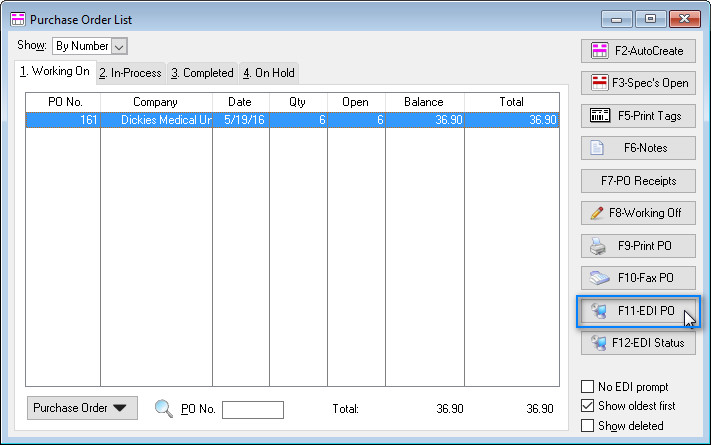
| Note: A purchase order cannot be edited once it has been sent via EDI. To prevent accidentally making changes after it has been sent, select the F8-Working Off button to move the purchase order to the In-Process tab of the Purchase Order List. If changes must be made to the purchase order after is has been sent via EDI, you will need to contact the vendor’s customer support. |
What Do I Do Once My EDI Order Arrives?
When your order starts to arrive, you will need to create a Receiving List or a Purchase Order receipt by selecting the Receive icon on the program’s toolbar. If you would like to see if your desired vendor has provided an Advanced Shipping Notice (ASN) for your order, select the F-10 Get ASN’s button. Once the ASN is downloaded, select F11-ASN List to view the list downloaded ASN’s.

| Note: Advance Shipping Notices (ASN’s) contain information about the contents of individual shipments that have been shipped from a vendor. An ASN is made of cartons and individual items in each carton. Each item in a carton is identified by a UPC barcode number and includes the quantity shipped. The original purchase order for each item is also referenced so that the item can be properly received. |
Who Exactly Are These Connected Partners?
Connected Partners are vendors that have worked with us to include their catalog in The Uniform Solution program, and provide exclusive features that are available to our mutual customers. Today there are over 50 brands listed in the Vendor Catalog and over 14 vendors that “connect” with The Uniform Solution, and they include top brands like Cherokee, Wink, and Landau. To view the entire list of participating vendors, click here.

EDI ordering is an excellent feature that is provided to save you time. By seamlessly connecting the purchase order process with your vendors, you are able to accomplish the daunting task of ordering inventory quickly and more efficiently.
